

Artificial intelligence tools are becoming part of daily work across writing, design, coding, research, customer support, education, and business operations. People often see the final result an AI tool gives them, but they do not always understand what is happening behind the scenes. Two of the most important parts of any AI system are the system prompt and the model. These two components play a major role in shaping how an AI tool behaves, what kind of output it produces, and how safe, helpful, or accurate it can be.
If you have ever wondered why one AI tool sounds formal while another sounds friendly, why some tools are better at writing and others are better at coding, or why the same user question can produce different answers on different platforms, the reason often comes down to the system prompt and the model behind the tool.
This article explains the meaning of system prompts and AI models in simple language. It also shows how they work together, why they matter, where they are used, what risks they bring, and how businesses and users can use them more effectively.
What Is a System Prompt?
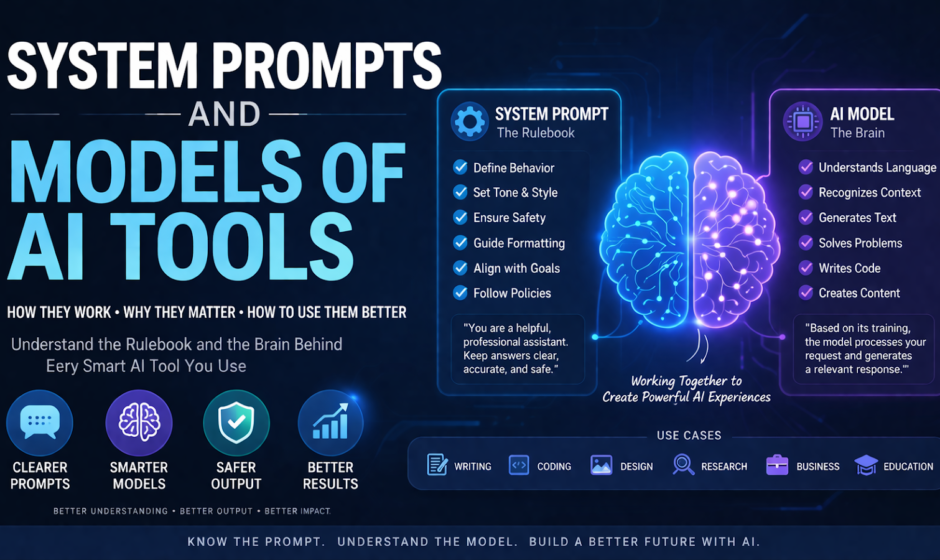
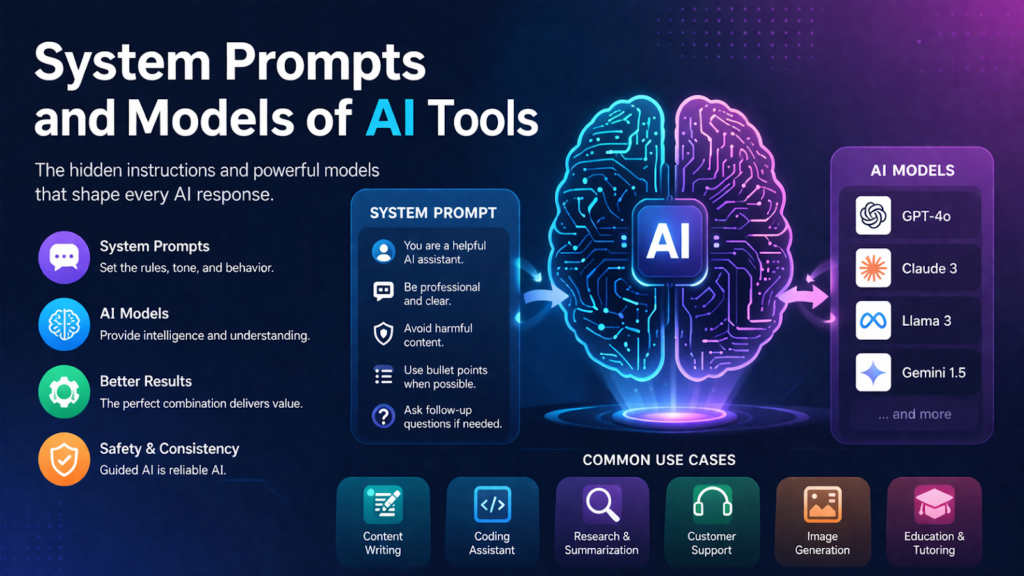
A system prompt is a set of instructions given to an AI before the user starts interacting with it. You can think of it as the hidden rulebook that tells the AI how to behave. It may define tone, priorities, limits, safety rules, formatting style, allowed actions, and general behavior.
Unlike a normal user prompt, which is visible and written during the conversation, a system prompt usually works in the background. It guides the AI throughout the interaction.
For example, a system prompt may tell an AI tool to:
- answer in a professional tone
- avoid harmful or unsafe instructions
- summarize content clearly
- ask follow-up questions only when necessary
- use simple language for beginners
- follow company policy
- format responses in bullets, tables, or structured sections
This means the system prompt is not the same as the user’s request. The user may ask, “Write a product description,” but the system prompt may already have told the AI to sound luxurious, avoid exaggerated claims, and keep the output under 150 words.
In simple terms, the system prompt shapes the personality and boundaries of the AI tool.
Why System Prompts Matter
System prompts matter because AI models are highly flexible. Without guidance, a model can respond in many possible ways. That flexibility is powerful, but it can also create inconsistency. A system prompt reduces that uncertainty.
Here are some of the main reasons system prompts are important.
1. They define behavior
A system prompt tells the AI what role it should play. It may act as a tutor, writing assistant, legal intake bot, technical support agent, or internal company helper. This role affects wording, tone, detail, and priorities.
2. They improve consistency
Businesses want AI tools to produce output that matches their brand voice and policies. A good system prompt helps ensure that the tool does not sound random from one conversation to the next.
3. They support safety
AI tools can be asked harmful, misleading, or risky questions. System prompts often include rules for refusing unsafe content, protecting privacy, or avoiding illegal guidance.
4. They guide formatting
Many companies need answers in a certain style. A system prompt can require short paragraphs, step-by-step instructions, summaries, or a customer-service tone.
5. They help match user expectations
A general model can do many tasks, but users often expect the tool to feel specialized. System prompts help create that specialized feel without retraining the model from scratch.
What Is an AI Model?
An AI model is the engine that generates the response. It is the trained system that has learned patterns from massive amounts of data and can predict the next word, interpret instructions, summarize information, generate code, answer questions, or create content.
In the case of language-based AI tools, the model is often a large language model, also called an LLM. This model has been trained on a wide range of text so it can understand and generate natural language.
The model is what gives the AI its raw capability. It is responsible for tasks such as:
- understanding language
- recognizing context
- generating coherent text
- rewriting or summarizing content
- translating between languages
- producing code
- following instructions
- reasoning through problems
If the system prompt is the rulebook, the model is the brain doing the work.
How Models and System Prompts Work Together
System prompts and models are closely connected. One without the other is not enough for a good AI tool experience.
The model provides the intelligence and language ability. The system prompt channels that ability in a certain direction.
Think of it like this:
- The model is a highly skilled employee with broad knowledge.
- The system prompt is the company handbook and job description.
A skilled employee may know many things, but they still need direction. They need to know what tone to use, what tasks matter most, what rules to follow, and what not to do. The same is true for AI.
For example, two tools might use a similar underlying model, but their outputs can feel very different because their system prompts are different. One may be tuned for customer support, while another may be designed for creative writing. The model can do both, but the system prompt pushes the output toward the intended use.
Types of AI Models Used in Modern Tools
There are many kinds of AI models, and different tools rely on different ones depending on the task.
Large Language Models
These are used in chatbots, writing assistants, coding tools, research assistants, and document analysis platforms. They are designed to understand and generate text.
Vision Models
These models interpret images. They can identify objects, describe scenes, extract information, or support image-based tasks.
Speech Models
These models convert speech to text or text to speech. They are used in voice assistants, dictation software, and accessibility tools.
Image Generation Models
These models create images from written prompts. They are widely used in design, marketing, entertainment, and concept art.
Multimodal Models
These models can handle more than one type of input, such as text, images, and sometimes audio. They are becoming more common in advanced AI tools because they support more natural workflows.
Each model type has its own strengths, limits, speed, and cost. That is why choosing the right model is a key part of building an effective AI product.
Why Different AI Tools Use Different Models
Not every AI tool needs the same model. A business support bot, a medical summarization system, a design generator, and a coding assistant all have different requirements.
Some tools need:
- faster answers
- lower cost
- higher reasoning quality
- stronger safety controls
- better multilingual support
- more accurate structured output
- image understanding or generation
- domain-specific performance
As a result, companies often choose models based on the task they want the tool to perform. A lightweight model might be best for quick customer replies, while a more advanced model may be better for legal drafting, analysis, or complex coding.
The quality of the final AI experience depends heavily on whether the model is a good fit for the job.
The Role of Prompt Engineering
Prompt engineering is the process of designing instructions that help the AI produce better results. System prompts are one part of prompt engineering, but they are not the whole picture.
There are generally three instruction layers in many AI systems:
- System prompt
Hidden instructions that set core behavior. - Developer prompt or tool instructions
Additional rules added by the platform or product team. - User prompt
The question or request made by the person using the tool.
Prompt engineering is about making these layers work together well. A strong system prompt can improve clarity, reduce mistakes, and create a more reliable user experience.
Good prompt engineering often includes:
- clear role definition
- output format instructions
- safety boundaries
- fallback behavior
- concise rules
- examples when needed
- priority handling for conflicting instructions
Poor prompt design can cause vague, repetitive, off-brand, or risky output.
Examples of System Prompts in Real AI Tools
To understand this better, let us look at common examples.
Customer Support Bot
A system prompt may instruct the AI to:
- sound polite and calm
- keep answers short
- never invent refund policies
- direct billing issues to a human agent
- apologize when the system is unsure
Writing Assistant
A writing-focused tool may be told to:
- improve grammar and flow
- keep the original meaning
- avoid robotic wording
- write in plain English
- follow a specific brand tone
Coding Assistant
A coding tool may be instructed to:
- produce runnable code
- explain logic clearly
- avoid insecure patterns
- include comments where useful
- prefer efficient solutions
Internal Knowledge Assistant
A company AI assistant may be asked to:
- answer only from approved internal documents
- cite sources when possible
- say when information is missing
- avoid guessing
- protect confidential material
These examples show that system prompts are often tailored to the exact use case of the tool.
Benefits of Well-Designed System Prompts
A strong system prompt can improve an AI tool in several ways.
Better user experience
Users get more useful, relevant, and understandable answers.
Stronger brand alignment
Businesses can make AI outputs match their tone and communication style.
Reduced risk
Safety rules can limit harmful or non-compliant behavior.
Improved efficiency
Clear instructions reduce the chance of confusing or unusable output.
Greater trust
When an AI behaves consistently and transparently, users are more likely to trust it.
In many cases, improving the system prompt can meaningfully improve the tool even without changing the model itself.
Limits of System Prompts
System prompts are powerful, but they are not magic. They do not fully control the model in every situation.
Some key limits include:
They cannot guarantee perfect accuracy
A system prompt can tell the model to avoid guessing, but the model may still produce errors.
They can conflict with user input
Users sometimes try to override instructions. This can create tension between hidden system rules and visible user requests.
They do not replace good data or evaluation
Even a great prompt cannot fix a weak model or poor product design.
They may become too long or complex
Overloaded prompts can create confusion or make behavior less stable.
This is why AI product design requires testing, iteration, and quality checks beyond prompt writing alone.
Common Risks in AI Tools
AI tools can be helpful, but they also carry risks. Understanding system prompts and models helps explain where those risks come from.
Hallucination
This happens when the model gives false information confidently. It may sound correct even when it is not.
Prompt injection
In some systems, users may try to manipulate the AI into ignoring its original rules.
Bias
Models can reflect patterns and biases present in training data or design choices.
Privacy issues
If sensitive information is handled poorly, the AI tool may expose or misuse it.
Overconfidence
An AI may present uncertain information too strongly unless specifically guided not to.
System prompts can reduce some of these risks, but they do not eliminate them entirely.
Best Practices for Building Better AI Tools
If you are building or managing an AI tool, it is important to think carefully about both the model and the system prompt.
Start with the use case
Do not pick a model just because it is popular. Choose one that fits the actual task.
Write clear instructions
System prompts should be specific, readable, and focused on outcomes.
Keep priorities clear
Tell the AI what matters most. For example, safety may come before completeness.
Test with real scenarios
Run the tool through realistic user queries, edge cases, and failure cases.
Monitor output quality
Review how the tool performs over time, not just at launch.
Update prompts as needed
Business goals, policies, and user needs change. Prompts should evolve too.
Combine prompts with retrieval or tools
For factual tasks, connect the model to reliable data sources rather than asking it to rely only on memory.
How Businesses Use System Prompts for Competitive Advantage
Many companies now treat prompt design as part of product strategy. Two companies may use similar AI models, but the better-designed workflow often wins.
A strong system prompt can help a company:
- create a unique brand voice
- improve customer satisfaction
- reduce support costs
- automate repetitive work
- support staff with internal knowledge
- deliver more polished AI experiences
In other words, the competitive edge does not come only from having AI. It comes from how the AI is designed, guided, and integrated into real work.
The Future of System Prompts and AI Models
As AI tools continue to grow, system prompts and model selection will become even more important. Future tools are likely to include:
- more personalized AI behavior
- stronger memory and context handling
- better multimodal ability
- more tool use and automation
- improved safety layers
- more domain-specific model choices
At the same time, users will expect AI systems to be more transparent. They will want to know when the AI is uncertain, where the information comes from, and what rules it is following.
This means the future of AI tools is not just about bigger models. It is also about smarter orchestration, clearer instruction design, stronger trust, and better human oversight.
Final Thoughts
System prompts and models are the foundation of modern AI tools. The model provides the core intelligence, while the system prompt shapes how that intelligence is used. Together, they influence tone, quality, safety, consistency, and usefulness.
For everyday users, understanding these ideas makes it easier to use AI more effectively. For businesses, developers, and product teams, mastering system prompts and model selection can improve performance, reduce risk, and create a more valuable tool.
As AI becomes more deeply woven into digital products and workflows, the tools that perform best will be the ones built with clear purpose, the right model, and thoughtful system-level guidance. That is what turns raw AI capability into something practical, reliable, and worth trusting.
FAQs About System Prompts and Models of AI Tools
What is the difference between a system prompt and a user prompt?
A system prompt is a hidden instruction set that guides the AI’s behavior. A user prompt is the direct request made by the user during the interaction.
Can a system prompt change the personality of an AI tool?
Yes. It can strongly influence tone, style, structure, and behavior, though it does not change the core training of the model itself.
Why do two AI tools give different answers to the same question?
They may be using different models, different system prompts, different safety rules, or different connected data sources.
Are system prompts enough to make AI accurate?
No. They help guide behavior, but accuracy also depends on the model, the data source, the workflow, and testing.
Why are AI models important?
AI models provide the actual language understanding and generation ability. Without the model, the AI tool cannot interpret or respond to user requests.
Can businesses customize AI tools with system prompts?
Yes. Many businesses use system prompts to align AI behavior with brand voice, customer service rules, compliance standards, and specific workflows.