
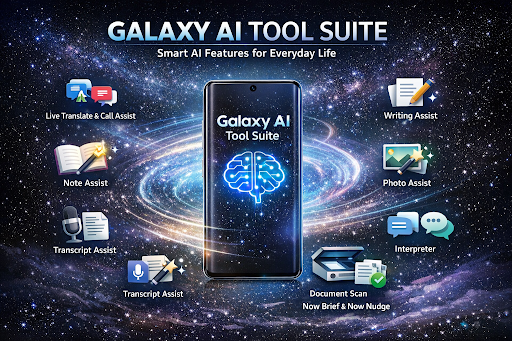

Artificial intelligence has moved from being a futuristic concept to an everyday utility, and Samsung’s Galaxy AI Tool Suite is one of the clearest examples of that shift. Built into select Galaxy devices, Galaxy AI is designed to help users communicate more easily, work more efficiently, create better content, and manage daily tasks with less friction. Samsung presents Galaxy AI as a set of tools that support creativity, productivity, communication, personalization, and context-aware assistance across its device ecosystem.
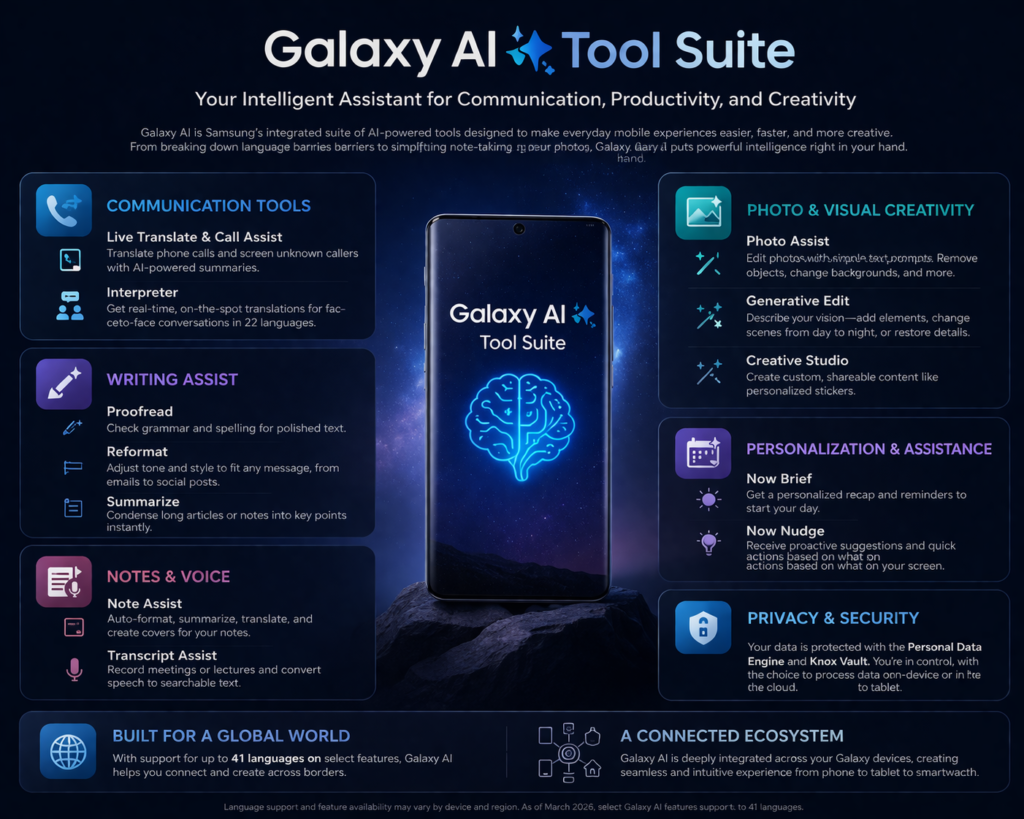
Rather than functioning as a single app, the Galaxy AI Tool Suite is a collection of integrated features spread across Samsung’s phone, notes, gallery, voice, browsing, and assistant experiences. Current official Samsung materials highlight tools such as Photo Assist, Creative Studio, Writing Assist, Document Scan, Transcript Assist, Note Assist, Interpreter, Call Assist with Live Translate, and newer personalized experiences such as Now Brief and Now Nudge. Samsung also describes upgraded Bixby capabilities and privacy controls that let users decide whether some Galaxy AI data is processed on-device or in the cloud.
This matters because mobile AI is no longer just about voice assistants answering simple questions. Samsung is positioning Galaxy AI as a practical system that understands intent, anticipates needs, and suggests or performs actions directly inside daily workflows. In Samsung’s 2026 messaging around the Galaxy S26 series and MWC 2026, the company emphasized more intuitive, agentic, and context-aware experiences that simplify planning, organizing, creating, sharing, and communication.
For users, the appeal of the Galaxy AI Tool Suite is simple: it saves time. Instead of opening several apps and manually handling translation, formatting, summarizing, transcription, editing, and organization, Galaxy AI aims to bring those capabilities directly into the native Samsung experience. That makes it useful for students, professionals, creators, travelers, multilingual users, and business teams alike. Samsung’s business-facing materials also frame Galaxy AI as valuable for smarter collaboration and workplace efficiency.
What Is the Galaxy AI Tool Suite?
The Galaxy AI Tool Suite refers to Samsung’s family of AI-powered features available on supported Galaxy devices. These tools are not limited to one narrow use case. Instead, they span several categories: communication, writing, note-taking, voice transcription, search, image editing, personalization, and device assistance. Samsung’s official Galaxy AI pages consistently group these tools around real-world activities rather than abstract AI language, which suggests the company wants users to think of them as practical helpers rather than experimental add-ons.
A major strength of the suite is integration. For example, a user may record audio, generate a transcript, summarize the meeting, move key points into notes, reformat those notes, and then refine a message or email using Writing Assist. In parallel, the same user can use Live Translate during calls, Interpreter during face-to-face conversations, and Photo Assist for visual cleanup or generative edits. Samsung’s official support and product pages show that the suite is built to reduce switching between separate tools and services.
Another important part of the Galaxy AI Tool Suite is language support. Samsung states that as of March 2026, several Galaxy AI features support a substantial number of languages, though the exact number varies by feature. For instance, Samsung says Photo Assist, Creative Studio, and Writing Assist support 41 languages, while Call Assist, Note Assist, Interpreter, and Transcript Assist support 22 languages. That expanding multilingual support makes Galaxy AI more relevant for international users and cross-border communication.
Key Features in the Galaxy AI Tool Suite
1. Live Translate and Call Assist
One of the most talked-about parts of Galaxy AI is Live Translate, which sits inside Samsung’s broader Call Assist experience. Samsung says this feature can translate phone calls, face-to-face conversations, and text interactions into a preferred language, making it easier for users to understand and respond across language barriers. For travelers, global businesses, customer-facing professionals, and multilingual families, this can turn a smartphone into a real-time communication bridge.
Samsung has also expanded the call experience further. On the Galaxy S26 series, the company says AI-powered Call Screening can identify unknown callers and summarize why they called, making call handling safer and more efficient. This suggests that Galaxy AI is moving beyond translation into intent-based call management.
2. Note Assist
Note Assist is designed to improve organization and note-taking inside Samsung Notes. Samsung says it can help with automatic formatting, summarizing, spell checking, note translation, and creating customized Note Covers. It can also work with voice memos that are converted into transcripts and saved to Samsung Notes. This makes Note Assist especially useful for lectures, meetings, brainstorming sessions, interview notes, and research summaries.
For users who often collect scattered information, this is one of the most practical features in the Galaxy AI Tool Suite. Instead of cleaning up raw notes manually, Galaxy AI helps convert rough input into readable and structured output. That reduces editing time and makes notes easier to share or review later.
3. Transcript Assist
Transcript Assist is particularly valuable for anyone who works with spoken content. Samsung’s support documentation describes it as a feature that records speech and creates a transcription of what was said. The company positions it as useful for meeting minutes and other documentation needs. In practice, this means users can capture spoken discussions and quickly convert them into searchable text.
Within a professional environment, Transcript Assist can save hours of manual note-taking. In educational contexts, it can help students turn lectures into structured study material. Content creators, journalists, consultants, and team leads can also benefit from faster documentation workflows. Combined with Note Assist and Writing Assist, transcription becomes the first step in a wider AI-supported productivity chain.
4. Writing Assist
Writing Assist is one of the most broadly useful tools in the suite. Samsung says it can proofread, reformat, reword, and summarize text that a user has written or selected. That makes it helpful for emails, social posts, notes, messages, reports, and drafts that need quick cleanup or restructuring.
The real value of Writing Assist is speed plus convenience. Many users already rely on third-party AI tools for writing, but Galaxy AI brings those capabilities closer to native device use. Instead of copying text into an external platform, users can refine content within the phone experience itself. Samsung also states that Writing Assist supports 41 languages as of March 2026, expanding its usefulness across regions and use cases.
5. Photo Assist
Photo Assist is Samsung’s AI-powered image editing feature inside the Galaxy experience. Samsung says it offers powerful tools that let users get their photos looking the way they want. With the Galaxy S26 launch, Samsung also described new upgrades that allow users to describe edits in natural language, change scenes such as day to night, add elements, restore missing parts of objects, and even change outfits in photos.
This positions Photo Assist as more than a basic retouching tool. It reflects a broader shift toward conversational image editing, where users tell the system what they want rather than rely on technical controls. For casual users, this lowers the learning curve. For creators and marketers, it speeds up ideation and visual refinement.
6. Creative Studio
Samsung describes Creative Studio as a creation tool that helps users make custom content such as personalized stickers. While this may sound lightweight at first, it fits into a wider trend in mobile communication where personalization, visual expression, and quick content generation matter more than ever. From chat use to branding assets for small creators, tools like Creative Studio support more expressive and efficient content creation.
7. Document Scan
Samsung also highlights Document Scan as part of the Galaxy AI experience, saying it can automatically detect and clean up pictures of documents taken with the phone. This is highly practical for office users, students, legal professionals, field teams, and anyone digitizing paperwork on the go. Better scans mean clearer records, easier reading, and more professional file sharing without needing a separate scanning setup.
8. Interpreter
For in-person communication, Interpreter remains one of the most useful Galaxy AI tools. Samsung lists it alongside other communication features and notes that it supports 22 languages as of March 2026. Interpreter is designed for real-time face-to-face conversation support, making it especially relevant in travel, hospitality, education, international meetings, and customer service environments.
9. Now Brief and Now Nudge
Samsung’s newer AI experiences move toward proactive assistance. The company says Now Brief can provide reminders and recaps about the user’s day, while Now Nudge offers quick action prompts based on what the device recognizes is happening on-screen. These features suggest a more context-aware direction for Galaxy AI, where the system does not just wait for commands but helps surface relevant actions at the right moment.
Also read: AI Tool Cody: A Complete Guide to the Business AI Assistant Trained on Your Knowledge Base
Benefits of the Galaxy AI Tool Suite
The biggest benefit of the Galaxy AI Tool Suite is workflow consolidation. Communication, writing, translation, note management, transcription, and visual editing are all available within the Samsung environment. That can reduce reliance on multiple subscriptions and separate apps. Users get a more seamless mobile experience with fewer interruptions between tasks.
A second major benefit is time efficiency. Summaries, transcripts, formatting, translations, and suggestions allow users to move faster without sacrificing clarity. In professional contexts, minutes saved per task can add up significantly over time. Samsung’s business material specifically frames Galaxy AI as helpful for smarter teams, which aligns with this productivity-focused positioning.
A third benefit is accessibility across languages. The support for multiple languages across core tools means Galaxy AI can serve a wide global user base. That is particularly important for travelers, international students, business users, and multilingual households.
A fourth benefit is personalization and contextual awareness. Samsung’s newer messaging around Galaxy AI focuses on understanding user intent, anticipating needs, and suggesting relevant actions. This is a meaningful shift from static features toward more adaptive mobile intelligence.
Privacy and On-Device Protection
AI convenience often raises privacy concerns, and Samsung addresses this directly in its official Galaxy AI materials. The company says that for AI data processed on-device, the Personal Data Engine gathers and processes personal data safely, with extra protection through Knox Vault, Samsung’s hardware-based security system. Samsung also states that users can choose whether some Galaxy AI data is processed locally on-device or in the cloud.
This privacy flexibility matters because users do not all have the same comfort level with cloud AI processing. By giving users controls over how some data is handled, Samsung is trying to make AI adoption feel more secure and transparent. On newer devices, the company also says it offers Privacy Alerts that proactively notify users when certain apps with device admin privileges attempt to access sensitive data unnecessarily.
Who Should Use the Galaxy AI Tool Suite?
The Galaxy AI Tool Suite is relevant to several user groups. Students can use Transcript Assist, Note Assist, and Writing Assist for lectures, assignments, and revision. Professionals can use transcription, summarization, document cleanup, and writing tools for meetings and communication. Travelers benefit from Live Translate and Interpreter. Creators can use Photo Assist and Creative Studio. Business teams can improve speed and organization with AI-supported collaboration workflows.
For general consumers, Galaxy AI is also attractive because it is not limited to one advanced or niche skill. It touches common daily activities like taking notes, answering calls, editing photos, summarizing text, and staying organized. That broad usefulness is why Galaxy AI has become central to Samsung’s current mobile strategy.
The Future of Galaxy AI
Samsung’s 2026 announcements make it clear that Galaxy AI is evolving beyond isolated features. The company increasingly describes the platform in terms of connected ecosystem intelligence, context-aware actions, and agentic experiences that can understand intent and take meaningful action on the user’s behalf. That signals a future where AI is woven deeper into device behavior rather than added as optional tools.
If Samsung continues in this direction, the Galaxy AI Tool Suite is likely to become more predictive, more personalized, and more deeply integrated across phones, tablets, wearables, and smart home experiences. Based on Samsung’s current positioning, the focus appears to be less about flashy demos and more about making AI quietly useful in real moments. That is often what determines whether a feature becomes part of everyday life. This last point is an inference based on Samsung’s recent product direction and messaging.
Conclusion
The Galaxy AI Tool Suite represents Samsung’s effort to make mobile AI practical, integrated, and genuinely useful. From Live Translate, Note Assist, Transcript Assist, and Writing Assist to Photo Assist, Creative Studio, Document Scan, Interpreter, Now Brief, and Now Nudge, the suite covers a wide range of tasks that people already do every day.
What makes Galaxy AI stand out is not just the number of tools, but the way they work together inside the Samsung ecosystem. Users can translate, transcribe, organize, write, edit, and personalize without leaving the native device flow. Add Samsung’s privacy controls, expanding language support, and growing context-aware capabilities, and Galaxy AI becomes more than a feature list. It becomes a core part of the modern Galaxy experience.
For anyone looking at the future of mobile productivity and communication, Galaxy AI is worth paying attention to. It reflects where smartphones are headed: toward experiences that understand context, reduce effort, and help users move through daily life with greater speed and less friction.
FAQs About Galaxy AI Tool Suite
What is the Galaxy AI Tool Suite?
The Galaxy AI Tool Suite is Samsung’s collection of AI-powered tools for communication, productivity, creativity, note-taking, translation, transcription, and personalization on supported Galaxy devices.
What are the main Galaxy AI features?
Samsung highlights features such as Photo Assist, Creative Studio, Writing Assist, Document Scan, Note Assist, Transcript Assist, Interpreter, Call Assist with Live Translate, Now Brief, and Now Nudge.
Does Galaxy AI support multiple languages?
Yes. Samsung says several Galaxy AI tools support multiple languages, with support levels varying by feature. As of March 2026, Writing Assist, Photo Assist, and Creative Studio support 41 languages, while Call Assist, Note Assist, Interpreter, and Transcript Assist support 22 languages.
Is Galaxy AI private and secure?
Samsung says some Galaxy AI data can be processed on-device through its Personal Data Engine and protected by Knox Vault. Users can also choose whether certain data is processed locally or in the cloud.
Who should use Galaxy AI?
Galaxy AI is useful for students, professionals, travelers, creators, and business teams because it supports common tasks like translation, note organization, transcription, writing, scanning, and image editing.